




在PVE中新建Windows虚拟机,正常挂载virtio-win和系统镜像,安装过程中选择Standard或Datacenter中不带桌面体验版本安装,在服务器配置管理器(SConfig)中完成计算机名、远程桌面、网络设置后即可根据本文来配置基本的环境。
安装Qemu-Guest-Agent
查看磁盘
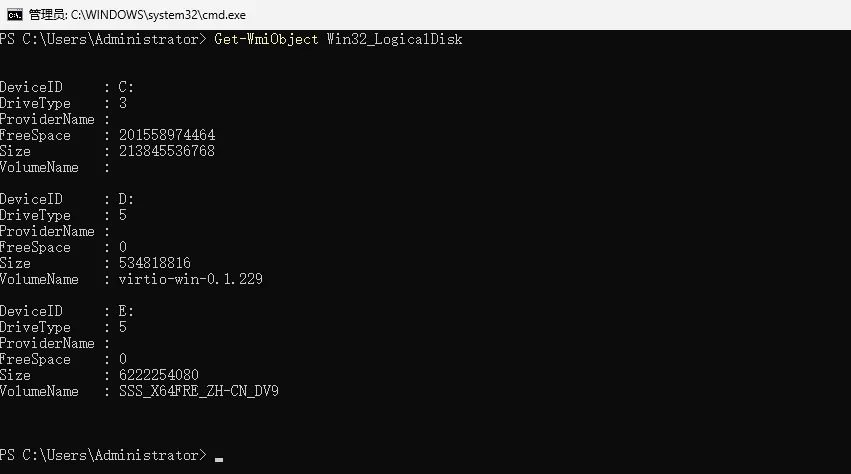
使用命令列出当前所有磁盘盘符及名称备注等,确定virtio-win挂载的盘符位置,如本文中virtio-win挂载在磁盘D
Get-WmiObject Win32_LogicalDisk
切换到磁盘D
Set-Location D:
安装驱动
pnputil -i -a D:\NetKVM\w11\amd64\*.inf
pnputil -i -a D:\Balloon\w11\amd64\*.inf
pnputil -i -a D:\vioserial\w11\amd64\*.inf
安装Qemu-Guest-Agent
msiexec /i D:\guest-agent\qemu-ga-x86_64.msi
Balloon设置
Balloon驱动程序是一种特殊的设备驱动程序,用于帮助虚拟化平台(如VMware、Hyper-V等)管理虚拟机的内存资源
#将Balloon相关文件复制到C:\Program Files\Balloon中
Copy-Item D:\Balloon\w11\amd64 -Destination 'C:\Program Files\Balloon' -Recurse

#切换至C:\Program Files\Balloon目录,执行安装
cd 'C:\Program Files\Balloon'

.\blnsvr.exe' -i
启用OpenSSH服务
Windows Server 2025中已经预装了OpenSSH客户端及服务端,只需启用服务并设置开机自启即可
查询安装情况
Get-WindowsCapability -Online | ? Name -like 'OpenSSH*'
查询服务状态
Get-Service sshd
启动服务
Get-Service sshd | Start-Service -PassThru
设置开机自启
Get-Service sshd | Set-Service -StartupType 'Automatic'
配置防火墙放行
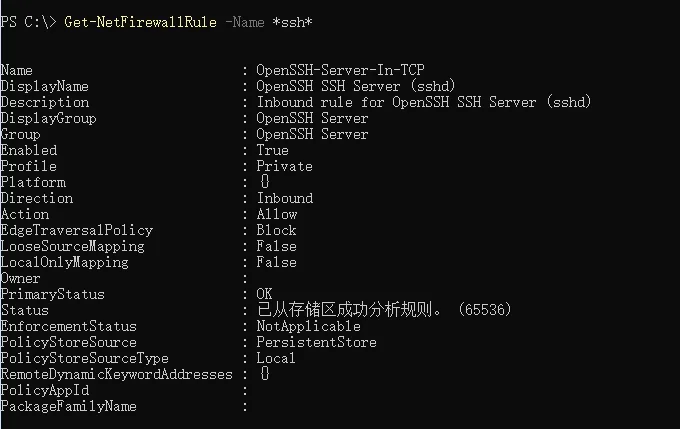
windows官方本身配置了SSH的放行策略,但是仅对内生效,外部无法访问。因此需要自己重新添加一条。
New-NetFirewallRule -Name "Allow-SSH-22" -DisplayName "Allow SSH 22" -Description "Allow inbound SSH" -Direction Inbound -LocalPort 22 -Protocol TCP -Action Allow -Enabled True
OpenSSH 配置默认 shell
通过将shell可执行文件的完整路径添加到 \SOFTWARE\OpenSSH 字符串值 DefaultShell 中的 Computer\HKEY_LOCAL_MACHINE\SOFTWARE\OpenSSH,即可设置\OpenSSH默认的shell类型。例如本文中将默认shell设置为了PowerShell.exe
New-ItemProperty -Path "HKLM:\SOFTWARE\OpenSSH" -Name DefaultShell -Value "C:\Windows\System32\WindowsPowerShell\v1.0\powershell.exe" -PropertyType String -Force
网络设置
允许ICMP
默认是关闭了ping的,新增一条允许ICMPv4的防火墙入站规则即可
New-NetFirewallRule -Name "Allow-ICMPv4" -DisplayName "Allow ICMPv4" -Description "Allow ICMPv4" -Direction Inbound -Protocol ICMPv4 -Action Allow -Enabled True
关闭IPV6
-
获取网卡信息
Get-NetAdapter -
禁用网卡的IPV6配置
Disable-NetAdapterBinding -Name "以太网" -ComponentID ms_tcpip6
防火墙相关配置
查看防火墙状态
netsh advfirewall show allprofiles
开启\关闭防火墙(公用配置)
netsh firewall set opmode mode=enable\disable
开启\关闭所有防火墙
netsh advfirewall set allprofiles state on\off
查看防火墙规则
Get-NetFirewallRule -Name '规则名称'
新增入站规则
New-NetFirewallRule -Name "规则名称" -DisplayName "规则显示名称" -Description "规则描述" -Direction Inbound -LocalPort 端口 -Protocol 协议 -Action Allow -Enabled True
删除防火墙规则
Remove-NetFirewallRule -Name '规则名称'
添加环境变量
[System.Environment]::SetEnvironmentVariable("变量名称", "变量值")
添加Java的环境变量
[System.Environment]::SetEnvironmentVariable("JAVA_HOME", "C:\Program Files\Java\jdk-21")
[System.Environment]::SetEnvironmentVariable("Path", [System.Environment]::GetEnvironmentVariable('Path', [System.EnvironmentVariableTarget]::Machine) + ";$($env:JAVA_HOME)\bin")
挂载SMB共享
#获取凭证
$cred = Get-Credential

#挂载
New-SmbMapping -RemotePath "\\server\share" -LocalPath "Z:" -Credential $cred -Description "Remote Share Mapping"

#查看挂载情况
Get-SmbMapping
评论区